
Arturia Pigments 7: New Sound Design Horizons for Producers
Hey producers, if you're chasing fresh sounds for your next electronic track, Arturia Pigments 7 just dropped the tools to get you there. This free upgrade brings experimental filters, a gritty new effect, and a smarter UI that helps you see and feel every preset's vibe. It's like Pigments read your mind and leveled up for 2025 sound design.
Why Pigments 7 Matters in Your Production Workflow
Pigments has long been a powerhouse for electronic music production, blending virtual analog, wavetable, granular, sample, harmonic, and modal engines into one synth plugin. Version 7 does not reinvent the wheel, but it sharpens the edges where you need them most. Expect punchier transients for kicks and basses, plus filters that turn ordinary patches into character-driven monsters.
Sound design is about intention: knowing the tone and timbre behind a preset so you can make it your own. Pigments 7's updates make that easier and can save you hours of tweaking. Whether you build techno basslines or sweeping pads, these features keep CPU use reasonable while delivering heavier hits. Reviews call it a 'character upgrade,' useful from bedroom setups to pro studios.
Dive into the New Filters: Rage, Ripple, and Reverb
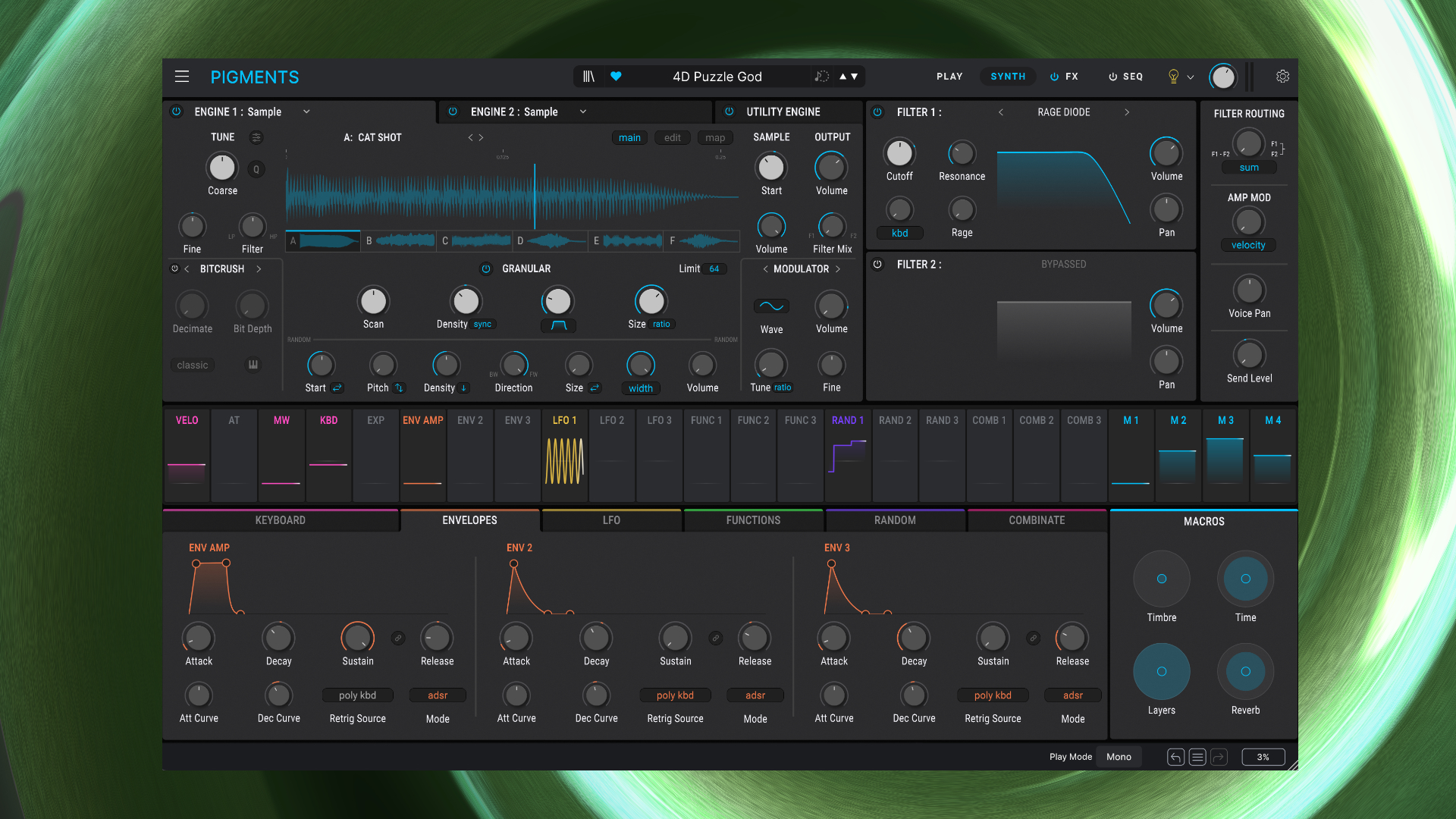
The stars of Pigments 7 are its three new filters, each starting with R for a reason. First up, the Rage filter: this model combines a resonant filter with distortion algorithms in five flavors. Crank the drive past 2 o'clock and you get self-oscillating screams that track your keyboard perfectly.
Rage is killer for gritty acid lines or adding energy to any sound, polyphonically saturating each note. Next, the Ripple filter uses phase-based modulation for laser-sharp transients and ringing highs. Modulate the cutoff for swept FX or crank resonance for metallic zaps.
Producers are raving about Ripple's modern edge, which suits non-tonal effects in electronic tracks. Don't sleep on the Reverb filter either. It applies tiny, short reverbs to tweak timbre rather than space, adding weight and character without muddying a mix.
Bonus: the Classic filter now accepts FM modulation from engines or modulators. Route audio-rate FM for wild harmonic twists. Practical tip: start with a basic saw wave, add Rage in Transistor mode, and LFO the cutoff. You will have a snarling bass ready for your drop in minutes.
Corroder Effect and Punchier Envelopes: Grungy Power
Meet the Corroder, Pigments 7's new distortion effect. It mixes noise and frequency modulation and targets specific bands with its built-in filter. Use it delicately for subtle grit or aggressively for total erosion.
Pair Corroder with a saw wave modulator sweeping the frequency and watch sounds transform, as demoed in bassline tests turning clean tones into corroded beasts. Under the hood, amplitude envelopes got a revamp with S-shaped curves. That gives a 0.3ms snap for transients, ditching clicks for harder-hitting kicks and hi-hats.
Your trance kicks or drum layers will cut through subs like never before. Arturia claims 15-20% less CPU on heavy patches, tested down to 48% load on older Macs. Producers, layer these patches without fear.
Reactive UI and Play View: Smarter Preset Browsing
Pigments 7's reactive Play View is a game-changer. This simplified pane shows waveforms, four macros, preset tags, and real-time modulation rings pulsing with your notes. It visualizes tone, timbre, and intention so you instantly know if a preset fits your track.
You can turn off animations if they feel too flashy, but many keep them for inspiration. Workflow tweaks include better modulation precision and drag-and-drop ease. The color-coded interface keeps things fluid, avoiding flow-breaking hunts for controls.
Pro tip: use the new genre-tagged expansions. Search 'Techno Bass' and pull from any engine. It's faster than digging through banks.
In-App Tutorials and Fresh Content Pack
Learning curve? Crushed. Pigments 7 adds guided tutorials right in the browser. Click 'Make a Talking Bass' and it highlights the Ripple filter, macros, and the mod matrix step-by-step.
Fundamentals of synth theory are explained via real use cases, no YouTube rabbit holes needed. New content floods in: 150 factory presets, 450 expansion ones, 50 wavetables, 30 samples, and 20 noises. All are optimized for the updates and tagged smartly.
Industry buzz from sites like CDM and Attack Magazine praises how these push boundaries without overwhelming your library.
Practical Tips to Crush Sound Design with Pigments 7
Ready to apply this? Here is your action plan:
- Bass boost: Load Bass Ventura preset, slap on Rage filter, tweak envelopes for snap, and modulate cutoff for movement.
- FX wizardry: Use Ripple for hi-end rings, add Corroder post-filter for grit, and LFO everything.
- Preset hack: Play View scouting: spot the vibe, macro tweak, export to your DAW.
- Layer pro: Stack granular pads with Reverb filter for depth while keeping CPU low.
- Trance punch: S-shaped envelopes on kicks, FM Classic filter for bite.
Test these techniques in Ableton or FL Studio. If you are new, grab Pigments via Arturia Software Center; existing users update free. At The Producer School, we love plugins like this for hands-on courses. Check our sound design modules to pair with Pigments 7 and level up faster.
Final Thoughts: Is Pigments 7 Worth Your Time?
Absolutely, especially because it is free for owners. There are no new engines, but the filters, Corroder, UI, and envelopes make the synth deadlier for electronic production. In 2025, when everyone's chasing unique timbres, Pigments 7 arms you first. Dive in, experiment, and tag us in your beats.