
Ableton Live 12.3: New Features for Electronic Producers
Ever wished you could rip apart any track into perfect stems without third-party plugins? Ableton Live 12.3 just made that possible for electronic producers like you.
This free update drops game-changing tools right into your workflow, from AI stem splitting to deeper Splice integration. It's packed with features that save time and spark creativity. Let's dive into why this matters for your next track.
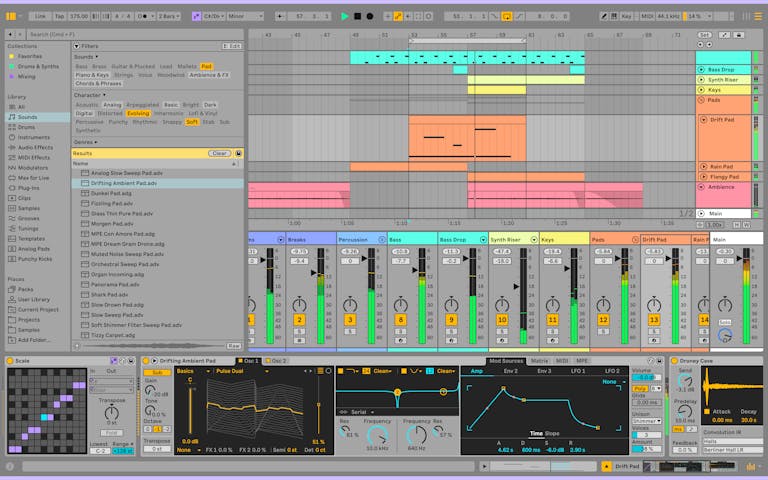
AI-Powered Stem Separation: Remix Anything Instantly
The star of Ableton Live 12.3 is built-in stem separation in Live Suite. Drop any audio clip into Arrangement or Session View, or even straight from the Browser, and split it into vocals, drums, bass, and other stems with a couple of clicks.
Powered by Music AI, the folks behind Moises, it runs completely offline on your machine. There is no uploading your samples to the cloud, just local processing. Producers are raving about grabbing clean acapellas for remixes or isolating drums to chop into new beats.
Here's how to use it right away: right-click an audio clip, select Stem Separation, and watch Live mute the original while dropping each stem into its own group track. Convert that bass stem to MIDI for tweaking, or layer the drums over your own patterns. It's a sample-based producer's paradise.
Industry pros say this removes clunky workarounds. No more bouncing to external apps or dealing with muddy extractions. In 2025, with sampling at the heart of electronic music, this feature alone justifies firing up Live 12.3 today.
Splice Integration and Faster Bounce Workflow
Ableton Live 12.3 levels up your sample hunting with seamless Splice integration. You can audition Splice samples directly in the Browser and try the new 'Search with Sound' to find matches for any audio you drag in.
Workflow gets even smoother with bounce upgrades. Bounce Groups in place lets you render entire group tracks, like your drum bus or vocal chain, into a single audio file without leaving the session. This is perfect for submixes or quick exports.
Then there's Paste Bounced Audio: copy a MIDI or audio clip, paste it as rendered audio on another track or take lane. Tweak parameters between pastes for rapid sound design iterations. These changes cut hours off your mixing sessions.
Practical tip: build a complex synth patch in a rack, bounce the group, then layer variations. Your tracks will sound polished faster, especially when prepping stems for collaboration or release.
Auto Pan-Tremolo and Device A/B Comparison
Say hello to the revamped Auto Pan-Tremolo device. Ableton rebuilt this classic with a tabbed interface for instant switching between pan and tremolo modes.
New controls include attack smoothing to keep transients punchy, frequency modulation tied to input levels, and extended sync options up to free-running seconds. Drop it on a pad or lead for head-spinning spatial effects, sidechain pumping, or polyrhythmic gates.
Bonus: Device A/B Comparison now lets you toggle between two parameter states on any built-in instrument or effect. Dial in a sound, hit A/B, tweak to version B, and compare on the fly. No more ear fatigue from endless knob twiddling.
For electronic producers, this shines in sound design. Map Auto Pan-Tremolo after a filter for evolving textures, or A/B your reverb chains to nail that spacious drop. These tools turn static ideas into movement-filled bangers.
Ableton Push 3 Updates: Hardware Goes Expressive
If you own a Push 3, Live 12.3 transforms it into an expressive beast. The new XYZ Pad Layout turns the grid into a 3D touch surface: X and Y for position, Z for pressure.
Slide your finger across pads to morph parameters in real time. Pre-mapped macros come stock on instruments and effects, but you can customize them, like X for cutoff, Y for resonance, Z for drive. It's Kaoss Pad vibes meets grid sequencing.
Touch-sensitive step editing humanizes beats effortlessly: hold Accent, slide vertically on pads to adjust velocities, even across multiple steps for smooth curves. Add the Rhythm Generator for instant procedural patterns, plus standalone stem splitting on Push.
Push 3 Standalone now supports class-compliant audio interfaces and duplicate devices. Producers call this the biggest hardware leap yet, making it a full music-making hub for live sets or deep studio jams.
New Packs, Generators, and Why Update Now
Live 12.3 packs in a free Generators Pack with creative MIDI tools for rhythmic and melodic ideas. Core Library updates include XY mappings on Rack presets for instant expressivity.
Bigger wins include a faster Windows installer, updated Max for VSTs, and control surface tweaks for gear like Novation Launch Control XL 3 or Komplete Kontrol MK3. All Live 12 users get this free, Suite unlocks stems and more.
In late 2025, with AI tools everywhere, Ableton's offline approach keeps you in control. Experts predict stem splitting will redefine remixing, while Push upgrades push hardware controllers forward.
Actionable Tips to Supercharge Your Productions
Start simple: import a favorite track, stem split it, and rebuild with your drums. Use Paste Bounced Audio on evolving automation for version control.
Assign XYZ macros on Push to your go-to filter bank, then perform live. A/B your master chain presets to shave mix time.
Grab the Generators Pack for beat breakthroughs when you're stuck. These aren't gimmicks, they are daily drivers for faster, better tracks.
Ready to level up? Check out The Producer School's Ableton workflows to pair with 12.3. Update now, produce tomorrow.
Ableton Project Files & Samples
Put these new features to use with our Ableton-ready sounds:
- Free Ableton Project Files - Learn from complete projects
- Melodic Techno Sample Packs - Drag-and-drop sounds for Ableton
- Free Sample Packs - Start exploring for free